Product & UX · 8 min read
SubLime Captions
An AI web tool that proofreads and translates subtitle files, so video creators review the work instead of doing it.
TL;DR
- Problem
- Auto-generated subtitles are full of errors. Fixing 800 to 1,000 lines by hand, then pasting each line into a translator and back, took a creator I work with 8 to 12 hours per video.
- Solution
- Upload a subtitle file, describe the video in one sentence, and let AI proofread or translate it in batches. The creator then reviews, accepts, reverts or edits each change.
- Result
- Live at sublimecaptions.com. The AI pass takes 2 to 5 minutes, and the whole job, including a full human review, takes about 1 hour.
- Role
- Solo product designer and builder: research, interaction, visual design and branding
- Timeline
- December 2025 to May 2026, maintained since
- Platform
- Web
- Tools
- Figma, Google AI Studio, Antigravity, Codex, Gemini API
- Status
- Live at sublimecaptions.com
- ~1 hourto proofread and translate a 15 to 20-minute interview, down from 8 to 12 hours
- 2–5 minfor the AI pass on a file of about 1,000 lines
- 800+subtitle lines in a typical 15 to 20-minute video, often more than 1,000
- 6 monthsfrom the first prompt to a complete product, designed and built solo
Interview videos by my friend Frank Yang, a YouTuber, took longer to caption than to edit. SubLime Captions is the tool I built for that job: upload a subtitle file, tell the AI what the video is about, and review what it proofread or translated. I did the research, interaction design, visual design and branding, and I built and shipped the product myself with AI coding tools. On a 15 to 20-minute interview, the work went from 8 to 12 hours to about 1 hour.
Context
In 2024 and 2025 I helped that friend shoot interview documentaries. Each video ran 15 to 20 minutes and produced 800 to 1,000+ subtitle lines from automatic speech recognition (ASR).
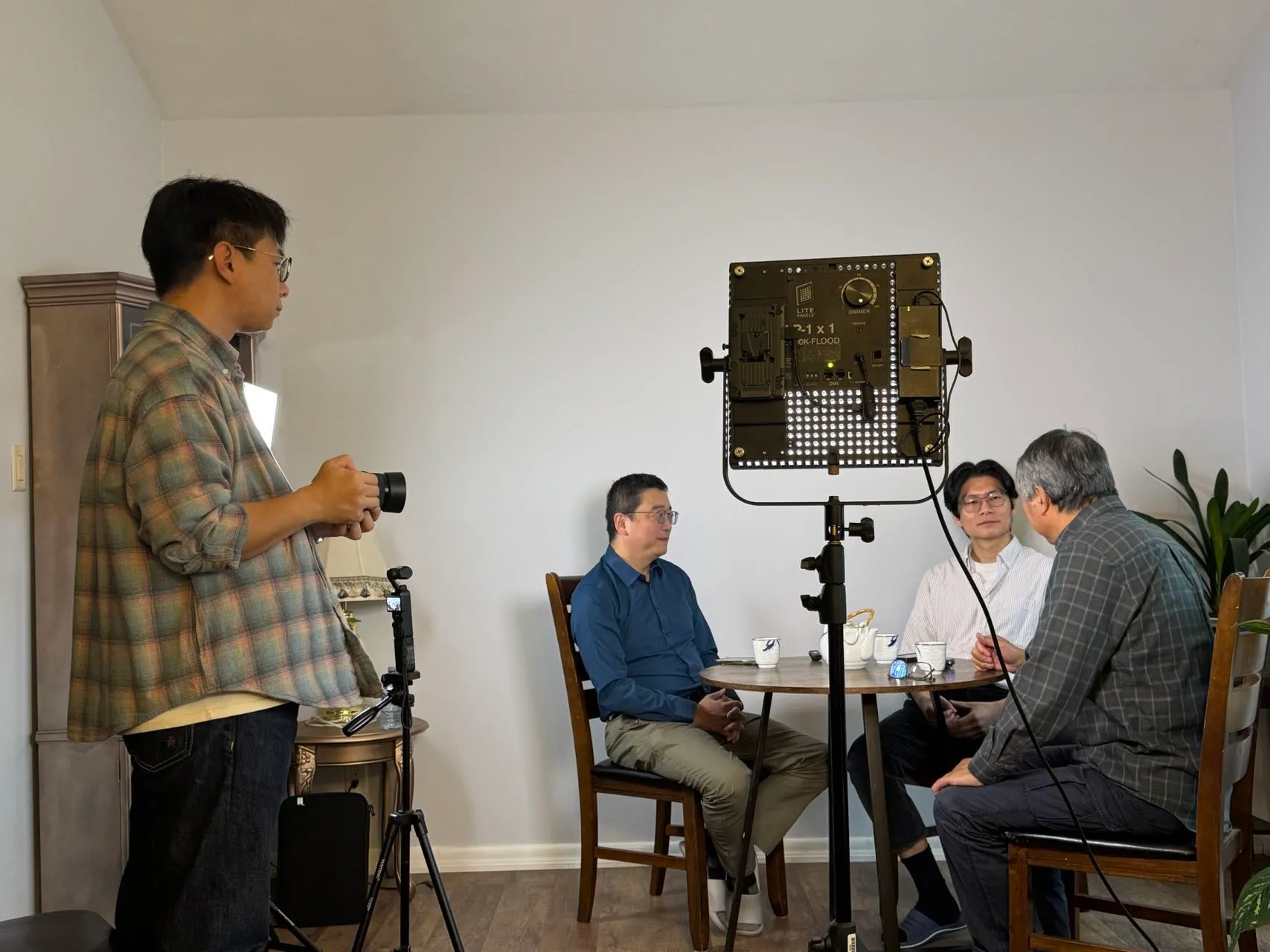
The ASR output was never clean. It got names and places wrong, misheard words, scattered punctuation, and kept every “um” and false start. The errors followed no pattern, so find and replace couldn’t fix them.
General-purpose AI didn’t solve it either. ChatGPT and Gemini couldn’t take a whole subtitle file in one go and return it with the timestamps intact. So the work stayed manual: read the file line by line and fix errors by hand, then, for translation, copy each line into a translator and paste the result back. One video took about a full working day.
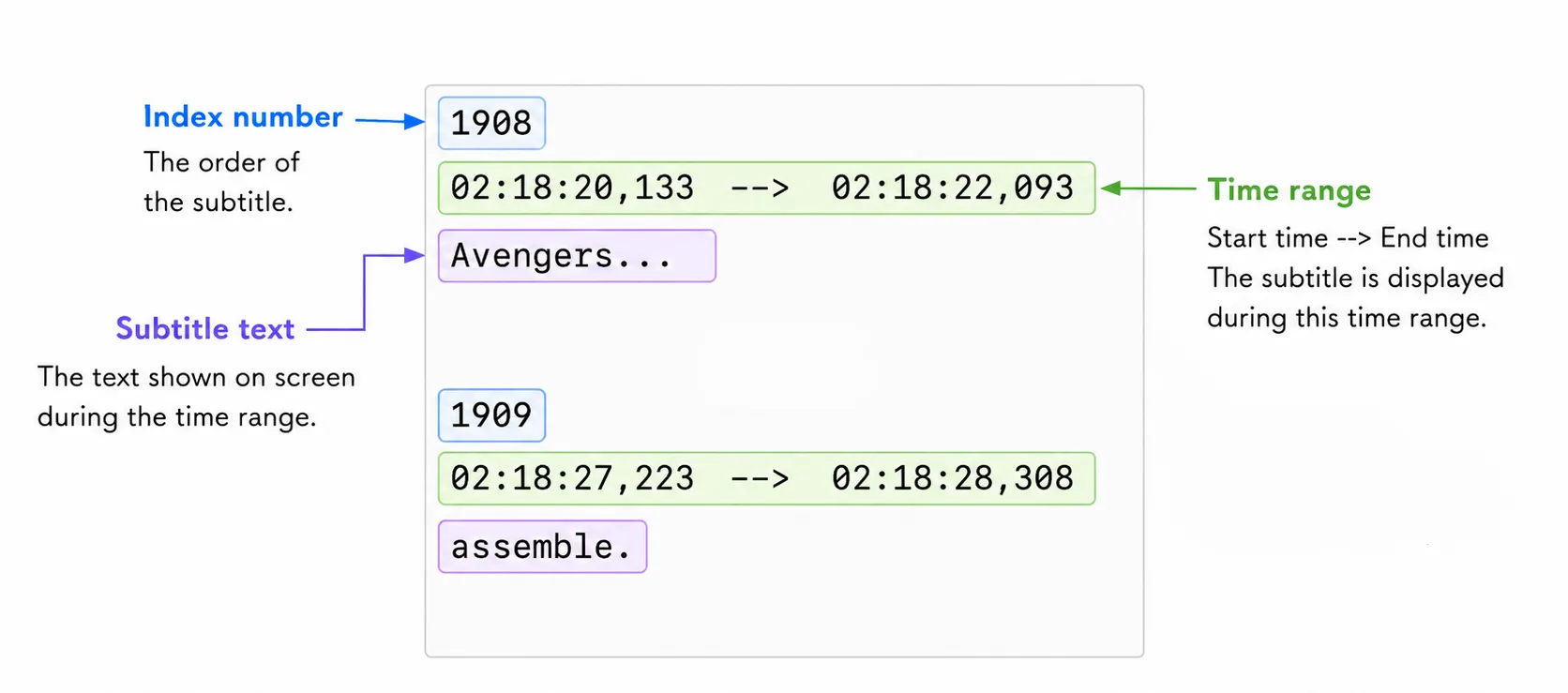
AI was already good enough to fix the text. What was missing was a workflow that could feed a long file to AI in pieces, keep the context, and write the results back safely, with a human still in charge.
Case 1 · I replaced a four-field form with one prompt box
- Question
- How should a creator tell the AI what the video is about?
- Options
- Keep the structured form; keep the form and add a free-text box; or use one prompt box, the pattern people know from ChatGPT and Gemini.
- Trade-off
- The form slowed people down, and anything that didn't fit a field got lost. A form plus a text box gave people two places to type the same thing.
- Decision
- One optional prompt box. The model tells background, names and instructions apart on its own, and rarely changed settings sit behind a + menu.
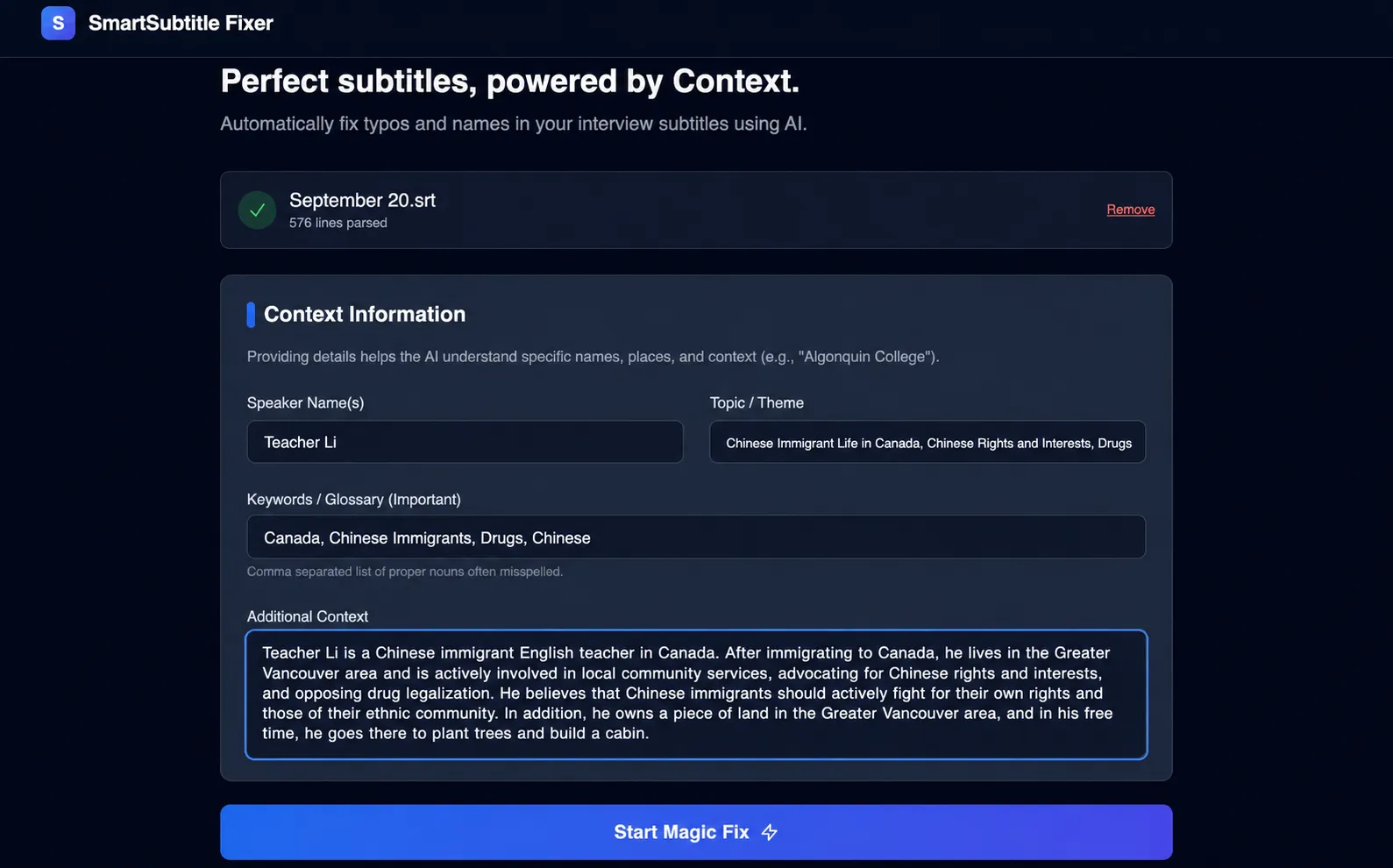
My first prototype, generated in Google AI Studio, asked for context in four fields: Speaker Names, Topic, Keywords and Additional Context. On my friend’s real file the corrections were good enough to prove the idea. But filling it in felt like paperwork. Before typing anything, you had to decide which box each fact belonged in.
One box, and you can leave it empty
Now a creator can write “This interview was filmed in Paris. The speaker is a designer. ‘Apple’ means the company, not the fruit,” and the AI works out the rest. A hint menu next to the box shows first-time users what kind of context helps.
The instruction is also optional. Most AI tools wait for a prompt, but here you can press send right away and the AI proofreads from the subtitles alone. The colour of the send button’s icon shows whether custom instructions are included. Settings people rarely change (filtering filler words, stutters and profanity, and punctuation handling) went into a + menu, where ChatGPT and Gemini put theirs.
Case 2 · Every AI edit stays visible and can be undone
- Question
- AI will get some lines wrong. What makes a creator willing to hand over the file?
- Options
- Apply the AI's edits to the file directly; or keep the original beside every edit, with review tools built for a long file.
- Trade-off
- Direct edits leave the creator searching 1,000 lines for mistakes they can't easily undo. If review is slow, they won't trust the tool.
- Decision
- A set of review tools that work together, so every AI edit is visible, reversible and editable, and the creator has the final say.
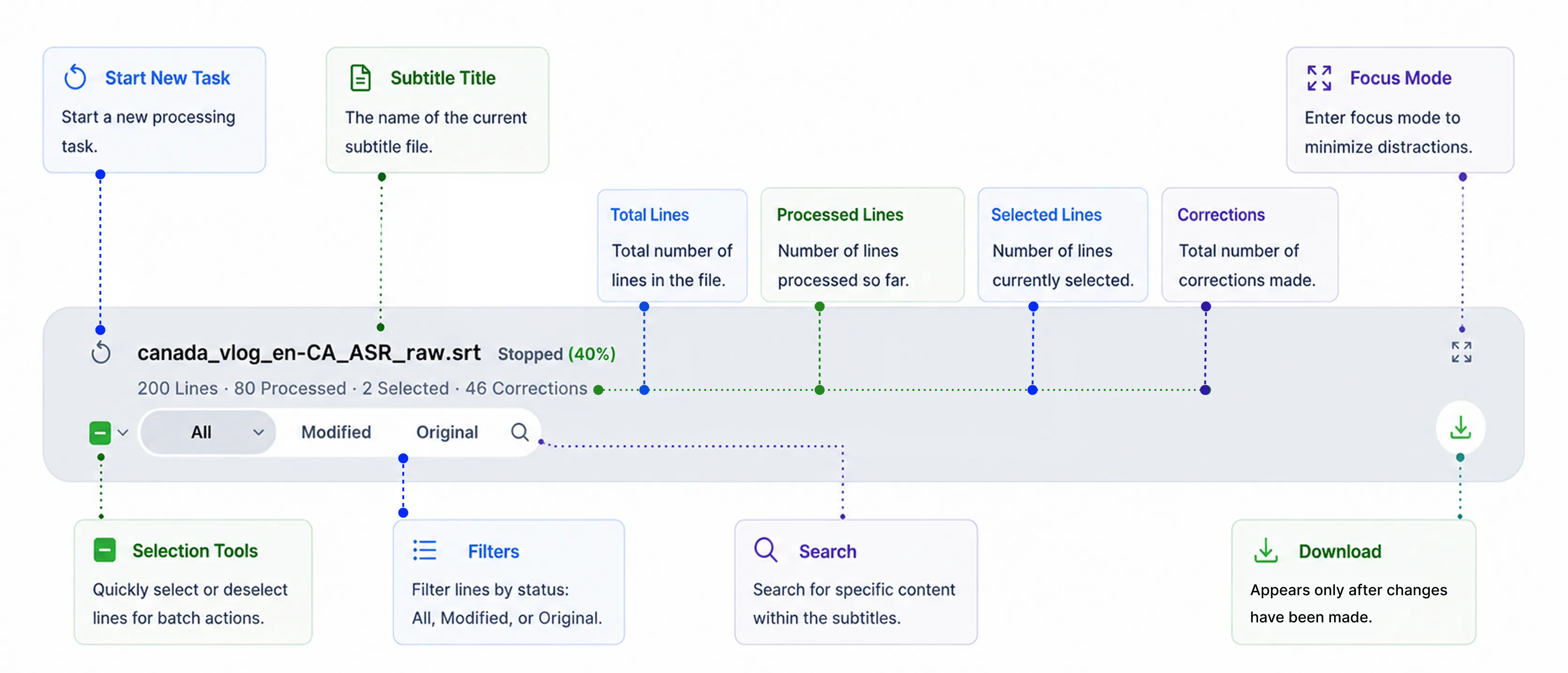
Compare view shows the original and the AI version side by side. Preview view shows only the final text, for a read-through. Status filters (All, Modified, Original) take you straight to the 200 lines the AI changed and skip the other 800. In translation mode the labels switch to “Translated”, so they always match the task.
Status you can see while scrolling
The line number doubles as status. It turns green when a line is processed and red when it fails, so problem lines stand out as you scroll past them.
Undo for one line or a whole paragraph
Revert and restore work on one line or on a selection, so a creator can reject a whole paragraph of translation and bring it back later. Manual edit covers the cases where neither version is right. Delete sits in the opposite corner from Save and Cancel, so a destructive action is never one slip away.
Case 3 · Selecting 200 lines takes one drag
- Options
- One checkbox per line; or selection tools built for a long list: drag to select, select all and invert, a selection pill and search.
- Trade-off
- Clicking 200 checkboxes one at a time doesn't scale, and a scattered selection is hard to check before sending it to the AI.
- Decision
- Drag across checkboxes to select a run of lines, with auto-scroll past the edge. A pill above the prompt box shows the selection and jumps to each selected line.
Creators often want AI on one part of the video, like a single interview segment. In a 1,000-line list, that needs faster ways to select and to check what’s selected.
Drag, invert, and jump
Press on any checkbox and drag across the others to select or deselect a run of lines. Drag past the edge of the editor and the list scrolls, so the selection keeps going. Select all and invert handle “everything except this part” in two clicks.
The selection pill sits above the prompt box and shows what’s selected, for example “Lines 20–50”. Selections in a long file are often scattered, so clicking the pill jumps through each selected line in turn. Creators can check what the AI is about to touch without scrolling. Selecting a line also brings back the prompt box if it was hidden, because selecting usually means you’re about to act.
Search the way people remember
People remember a problem line as a phrase, as “line 120”, or as “around 3:20”. Search matches subtitle text, line numbers and timestamps, so all three work.
Case 4 · Proofreading and translation run in either order
- Options
- A fixed pipeline, proofreading first and then translation; or two modes the creator can switch between at any time.
- Trade-off
- Some creators fix the source and then translate. Others translate first and polish the result. A fixed pipeline would force one group into a workaround.
- Decision
- Two modes. On each switch the latest result becomes the new source, and the previous stage stays available to download.
When you translate after proofreading, the AI works from the corrected text and leaves the raw ASR behind. Each switch also saves the previous stage, and the download menu offers both the current and the previous version. A creator can export corrected English subtitles and the French translation from the same session.
Three controls that appear only for translation
Translation mode adds a source language (auto-detect by default, because interviews often mix languages), a target language and a style slider. Faithful stays close to the original wording. Natural reads smoothly and keeps the meaning. Localized uses the idioms and phrasing a native viewer would expect, which suits social video.
Principles
Three principles shaped the decisions above.
- [01]
Say it, don't fill it in
Context goes in as plain language, not as form fields (Case 1).
- [02]
AI proposes, the creator decides
Every AI change is visible, reversible and editable (Case 2).
- [03]
Built for 1,000 lines, not 10
Every interaction has to hold up on a long file (Cases 3 and 4).
A lime-green identity that stays out of the way
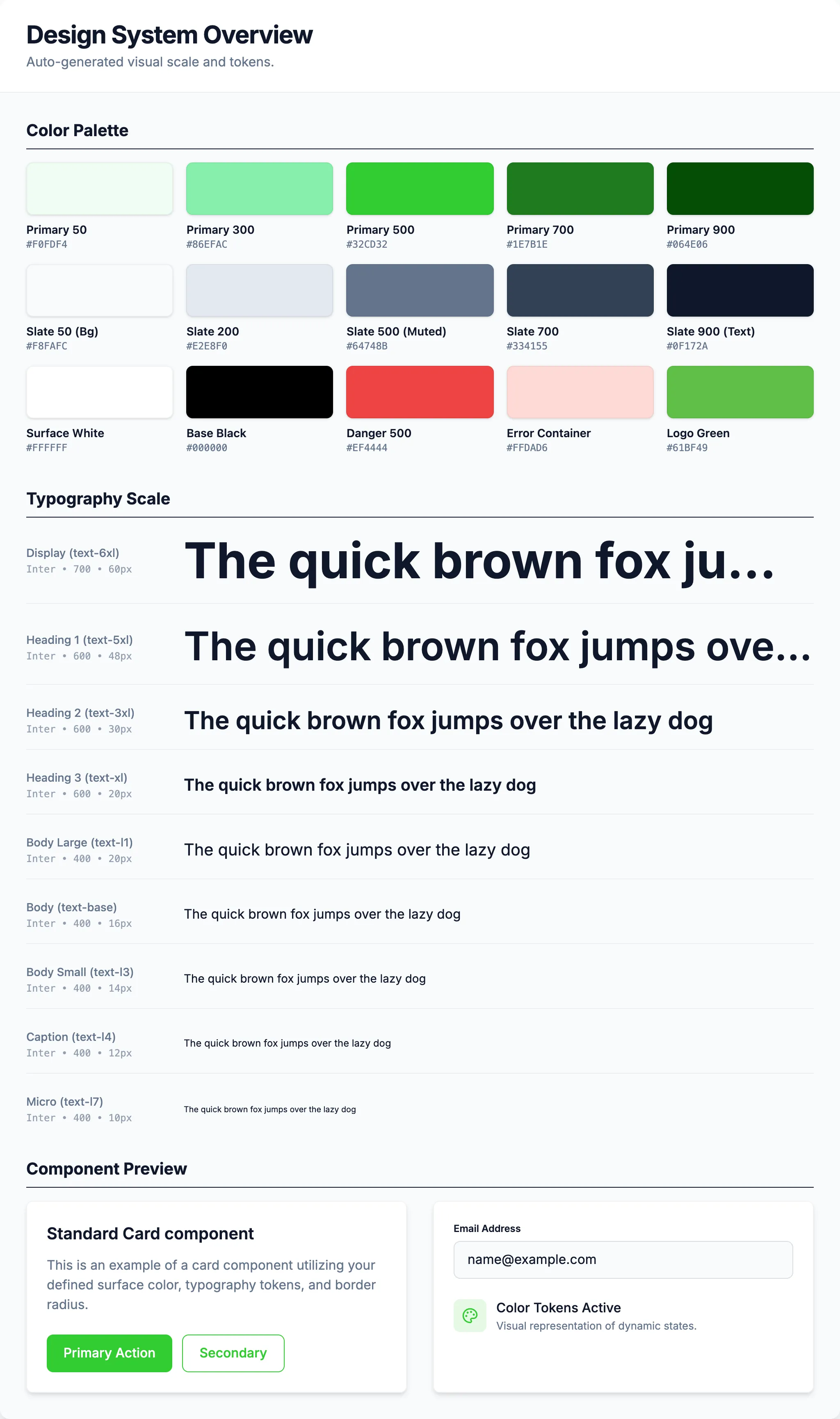
“SubLime” combines subtitle and lime, and sublime also means refined, which is what the tool does to captions. The logo is a lime slice with a play button in it. I chose lime green (#32CD32) and a few neighbouring greens because they feel fresh and energetic without looking cold.
The colour only appears where something needs attention: selected checkboxes, hover states, the soft glow around the editor while AI is working, and the progress bar. Subtitle text stays neutral, because reading it is the job. As the product grew, I turned these choices into a token-based design system with semantic colours for light and dark themes.
How I built it
The AI Studio prototype took one prompt and a few minutes to generate. Turning it into a complete product took about six months, from December 2025 to May 2026, working in Antigravity and Codex.
Most of the interaction design happened in the running product. I described a behaviour in plain language, let the AI implement it, used it on a real subtitle file, and refined it. Some details only show their problems once you can use them. Should the prompt box hide while you read? How fast should the selection pill jump? I couldn’t have answered either from a static mockup. For layouts that were hard to describe, such as where a menu should open, I sketched quick wireframes in Figma and handed them to the AI.
That speed only helps if the instructions are precise. “Make this button look better” got me nothing useful. What worked was a description of every state:
Light grey background, larger corner radius. On hover, fill with the lime theme colour. When the prompt box has text, turn the icon lime and add a soft shadow so it lifts slightly. Keep the transition subtle, around 0.2 seconds.
On a team I’d still use Figma to explore options and align with engineers. As a solo builder, the fastest way to judge an interaction was to use it.
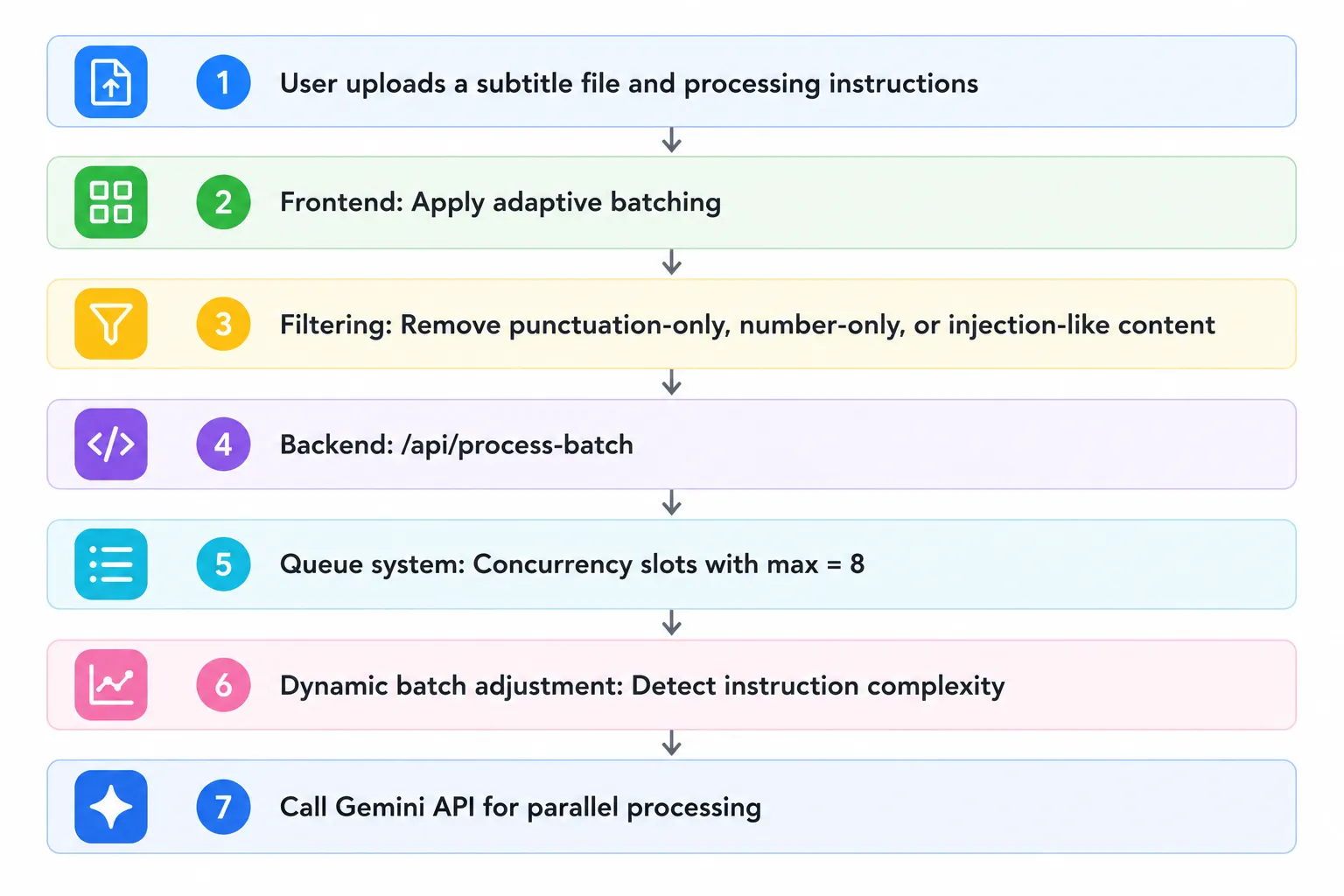
The hardest part was one creators never see: splitting a long file into batches. Batch size adapts to line length, several batches run in parallel, and each batch carries the lines before it as read-only context, so the AI doesn’t lose track of the conversation.
Outcome
SubLime Captions is live at sublimecaptions.com and free to use. Core development wrapped up in May 2026. Every request calls a paid AI model, and I pay for the API myself, so I haven’t promoted it. I use it as my own tool and as practice in product design. Even so, about 180 people have found the site on their own and visited it about 250 times (as of October 2026). I don’t have data yet on how well it works for anyone other than the creator it was built for.
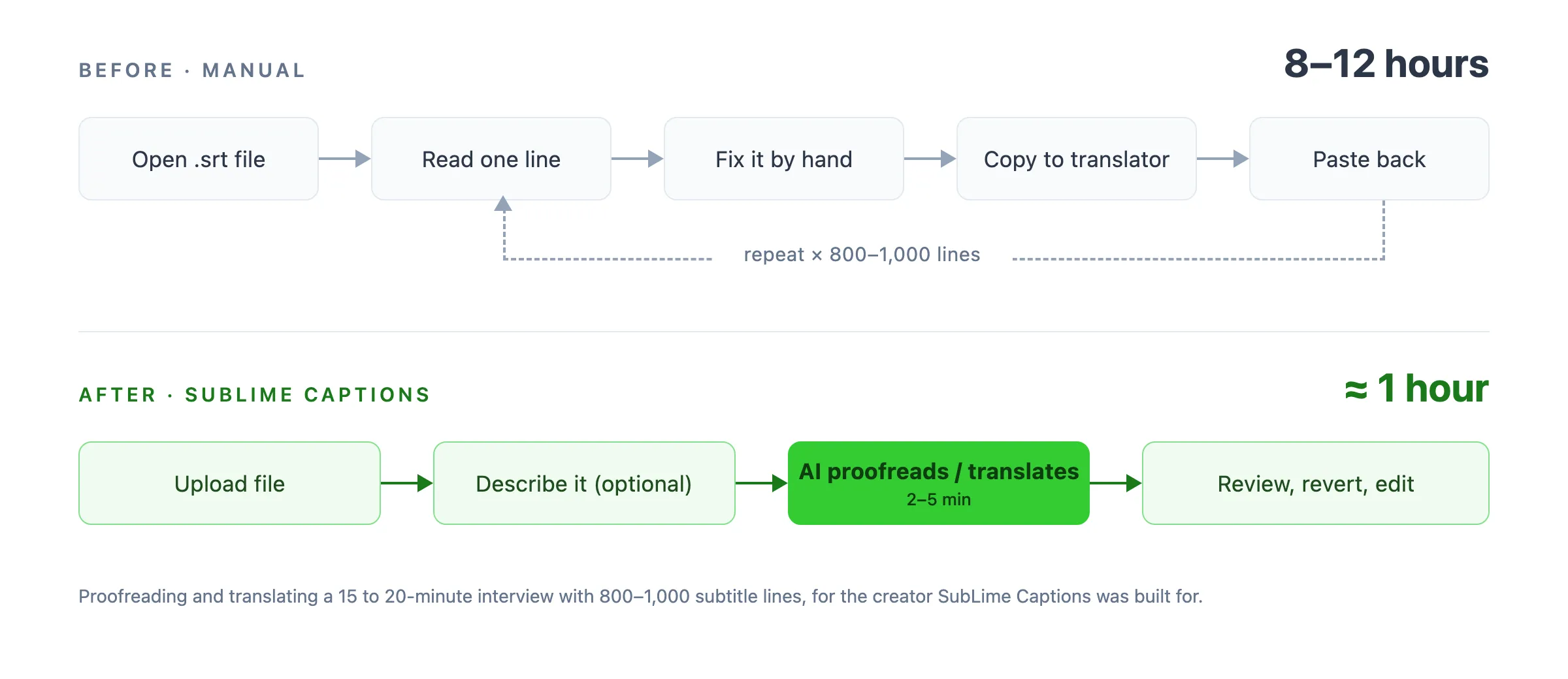
For that creator, proofreading and translating a 15 to 20-minute interview of 800 to 1,000 lines used to take 8 to 12 hours. With SubLime Captions it takes about 1 hour: the AI pass takes 2 to 5 minutes, and the rest is the creator’s review.
What changed after launch
A senior product manager reviewed the product and pointed out a risk: when a creator lists a name or term, the AI may treat it as something to insert, when it is only a spelling reference. In testing, the model sometimes did exactly that. I rewrote the prompt so user notes apply only where relevant, treated bare terms as spelling references, and added a regression test.
Because I pay for every request, I set a daily AI allowance per IP address. The FAQ used to say only “free during beta”. It now explains the limit in units creators understand: roughly 15,000 to 80,000 subtitle characters a day, resetting at midnight UTC.
I’ve also moved through several Gemini Flash versions and tuned the prompts along the way. The interface didn’t need to change, because review and control never depended on the model being perfect.
Reflection
In an AI product, much of the experience lives in review and control. The AI pass on a 1,000-line file takes minutes. Most of that hour, and most of my design work, went into how a creator sees what changed and decides what to keep.
Building with real data from day one changed how I validate design. I found problems by using the product on real files, which a mockup could not show me. Outside review still matters when you build alone: one conversation with a product manager surfaced a failure mode I hadn’t tested for.
What’s next
My research came from one creator’s workflow. Next I want to test with a wider group of creators, especially non-English and multilingual channels. I’d also add privacy-respecting analytics, such as how often AI edits are kept or reverted. That rate would be the clearest measure of trust.